Relational extract: table setup or your own SQL?
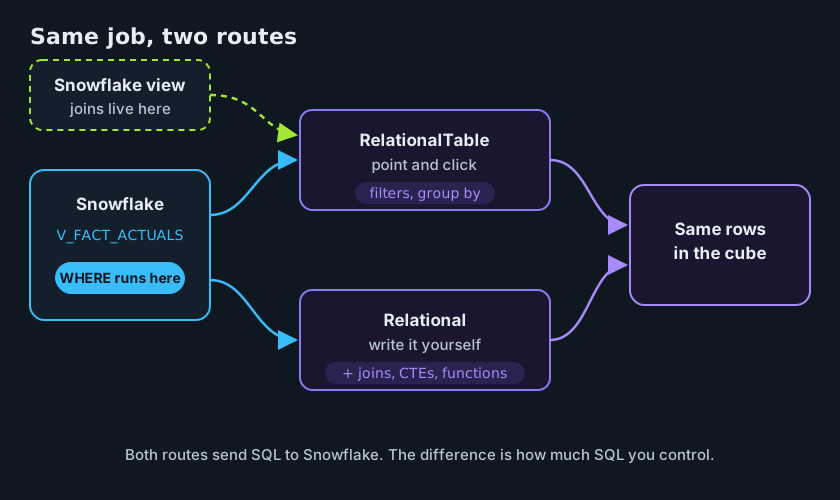
Jedox Integrator gives you two ways to read rows from Snowflake. The RelationalTable extract lets you point at a table or view and click your columns, filters and grouping together. The Relational extract lets you write the SELECT yourself.
A common belief is that the point-and-click version pulls the whole table into Jedox and filters there. It doesn't. Both run their filters in Snowflake. The real difference is how much SQL you're allowed to use.
What you'll build
- A pass-through Snowflake view,
V_FACT_ACTUALS, that the Jedox role can read. - A RelationalTable extract and a Relational extract that do the same job and return the same rows.
- A query history lookup that shows what Snowflake actually ran for each.
Before you start
You'll need
- The setup from From Snowflake to Jedox: your Snowflake connection (called
SNOWFLAKE_DEMOhere), the service userJEDOX_SVC, the roleJEDOX_ETL_ROLEand the warehouseJEDOX_ETL_WH. - The
PnLcube and its Cube Load from that post. - The sample data loaded with
load_snowflake.sql: Downloads.
Which Integrator UI?
The steps use the legacy Integrator UI.
The sample scenario
You'll do the same job both ways: load actuals for March 2026 (version Actual) from the sample data. Both routes should return 58 rows totaling 1,466,143.86.
1. Give the role a view to read
JEDOX_ETL_ROLE reads views only, so it can't select from FACT_ACTUALS directly. Create a plain pass-through view once and grant it to the role:
USE ROLE SYSADMIN;
CREATE OR REPLACE VIEW FDH_DEMO.SAMPLE.V_FACT_ACTUALS AS SELECT COST_CENTER, ACCOUNT, PERIOD, VERSION, AMOUNT FROM FDH_DEMO.SAMPLE.FACT_ACTUALS;
GRANT SELECT ON VIEW FDH_DEMO.SAMPLE.V_FACT_ACTUALS TO ROLE JEDOX_ETL_ROLE;
Why SYSADMIN here
We use SYSADMIN to keep the demo short. In a real setup, run this with a dedicated setup role that has only the rights this step needs, such as creating the view and granting access to it.
To undo it later:
Both routes below read V_FACT_ACTUALS. Download v_fact_actuals.sql
2. See the two routes
Swipe to see the full diagram →
3. Set up the extract
Both extracts use the SNOWFLAKE_DEMO connection and feed the same Cube Load into PnL.
- Add a RelationalTable extract and pick the connection
SNOWFLAKE_DEMO. - Choose the view
FDH_DEMO.SAMPLE.V_FACT_ACTUALS. - Pick the columns
VERSION,PERIOD,COST_CENTER,ACCOUNTandAMOUNT. Give them aliases if your Cube Load expects other names. -
Add two filters:
# Column Operator Value 1 VERSION=Actual2 PERIOD=2026-03Several filters are joined with AND unless you write a logical expression such as
(1 AND 2) OR 3. -
Group by
VERSION,PERIOD,COST_CENTERandACCOUNT, and aggregateAMOUNTwith a sum. That brings the data down to cube grain before it leaves Snowflake. - Optionally sort by
COST_CENTERandACCOUNT, and run the extract preview.
Available filter operators are =, <>, <, <=, >, >=, LIKE, IN, NOT IN, IS NULL and IS NOT NULL. There's also HAVING for filtering on aggregated values.
Want the period to come from a job variable such as ${PERIOD}? Check in your Integrator whether the filter value accepts it, as the docs don't say.
- Add a Relational extract and pick the connection
SNOWFLAKE_DEMO. -
Paste the query:
-
Run the extract preview.
To reuse the job for other months, swap '2026-03' for '${PERIOD}', as in From Snowflake to Jedox.
Use uppercase column names. Snowflake stores unquoted names in uppercase, so period in a table is really PERIOD. If a name gets quoted exactly as you typed it, "period" won't match. Typing uppercase avoids the question.
Aggregate in Snowflake, in both modes. Group down to cube grain (one row per Version, Period, CostCenter and Account) before anything reaches Integrator. Fewer rows cross the network, and the totals match the cube exactly.
4. Confirm both run in Snowflake
Both run in Snowflake
The RelationalTable extract doesn't download the table. It turns your columns, filters and grouping into a SELECT with WHERE, GROUP BY and HAVING, and Snowflake runs it. You can see this yourself. Run both extracts, then look them up in query history (the launch post's lookup plus a row count):
USE ROLE SYSADMIN; -- or any role with MONITOR on JEDOX_ETL_WH
-- What did Snowflake actually run? Both extracts show up here.
SELECT start_time, query_text, rows_produced, total_elapsed_time
FROM TABLE(FDH_DEMO.INFORMATION_SCHEMA.QUERY_HISTORY_BY_WAREHOUSE(WAREHOUSE_NAME => 'JEDOX_ETL_WH', END_TIME_RANGE_START => DATEADD('day', -7, CURRENT_TIMESTAMP()), RESULT_LIMIT => 10000))
WHERE query_tag = 'jedox_actuals_load'
ORDER BY start_time DESC;
Both queries carry the tag because From Snowflake to Jedox sets it on the service user (ALTER USER JEDOX_SVC SET QUERY_TAG = 'jedox_actuals_load'), so every query from JEDOX_SVC has it, including the SQL that RelationalTable generates. The lookup only covers the last 7 days.
Both queries should show a WHERE on PERIOD and produce 58 rows. The generated one also shows you exactly how Integrator wrote your column names.
5. Pick a route
| RelationalTable (point and click) | Relational (own SQL) | |
|---|---|---|
| Setup effort | ✓ Low, no SQL needed | ✕ You write and test the SQL |
| Filters (run in Snowflake) | ✓ | ✓ |
| Aggregation and sort (GROUP BY, without SQL) | ✓ | ✓ (in SQL) |
| Joins and CTEs | ✕ | ✓ |
| Other SQL functions (CASE, date and string functions) | ✕ | ✓ |
| Job variables | Check in your Integrator | ✓ |
| Readability for the next person | ✓ Settings are easy to scan | Depends on how clean the SQL is |
| Column renamed or dropped | Check in your Integrator | Check in your Integrator |
- One table or view, simple filters and a sum? Use the RelationalTable extract. It's quick to set up and easy for the next person to read.
- Need joins, CTEs, functions or job variables in the query? Use the Relational extract. The Jedox docs point to it whenever the table setup isn't enough.
- The middle ground: put the joins and logic in a Snowflake view, and let a RelationalTable extract read the view. The SQL lives in Snowflake where it's easy to test, and the Integrator side stays point and click. The optional view in the downloads shows the idea by joining the cost center group onto the actuals.
Check the result
Expected: 58 rows, total 1,466,143.86
Both routes should give the same answer for Actual 2026-03. Check the total plus a row count: 58 rows in the extract preview, then 1,466,143.86 in the cube after loading.
If it doesn't match
- One route returns more than 58 rows: the grouping is probably missing. Group by
VERSION,PERIOD,COST_CENTERandACCOUNT, and sumAMOUNT. - A column isn't found: use uppercase column names. A quoted
"period"won't matchPERIOD. - The role can't read the data: read
V_FACT_ACTUALS, notFACT_ACTUALS, and check the grant from step 1. - Your query doesn't show up in query history: the lookup only covers the last 7 days, only looks at
JEDOX_ETL_WH, and only finds queries taggedjedox_actuals_load.JEDOX_SVCgets that tag from the launch post, but a query tag set on the connection's session replaces it.
Wrap-up
Both extracts filter in Snowflake, so you're not choosing between fast and slow. You're choosing between simple and flexible. Start with the table setup, move the logic into a view when it grows, and write your own SQL when you need the full language. For the full load around it (service user, slice clear and Cube Load), see From Snowflake to Jedox.
Jedox docs: Relational extract and RelationalTable extract.
Downloads
All files use synthetic sample data and placeholder names.