From Snowflake to Jedox: a rerun-safe actuals load with Integrator
Most finance teams keep their actuals in a warehouse and do their planning in a separate tool. This post connects the two. You'll pull monthly actuals out of Snowflake and load them into a Jedox planning cube, in a way you can rerun as often as you like without leaving stale numbers behind.
What you'll build
- A dedicated Snowflake service user that logs in with a key pair instead of a password.
- A Snowflake view that shapes actuals exactly the way the Jedox cube expects them.
- A Jedox Integrator job that first clears the target slice, then loads the fresh actuals.
Before you start
You'll need
- Snowflake access with the
SECURITYADMINandSYSADMINroles, to create the role, warehouse, user and view. - Jedox with Integrator, and a license for Integrator's dedicated Snowflake connection (a premium connection).
opensslon the machine that will hold the private key.- The sample files and
load_snowflake.sql: Downloads.
Which Integrator UI?
Jedox 2026.1 ships a legacy Integrator UI and a new UI that's still in beta behind a toggle. The steps in this post use the legacy UI, because the new UI is still beta and not yet feature-complete.
The sample scenario
Everything here runs on made-up sample data: 10 cost centers, 8 accounts, and twelve months of budget and eleven of actuals for fiscal year 2026 (October 2025 to September 2026).
| File | What's in it |
|---|---|
dim_cost_center.csv |
10 cost centers, each with a parent group (Sales, IT, G&A, ...) |
dim_account.csv |
8 accounts, revenue and expense |
fact_actuals.csv |
610 rows of monthly Actual, Oct 2025 to Aug 2026 |
fact_budget.csv |
696 rows of monthly Budget, Oct 2025 to Sep 2026 |
Every fact row has the same five columns: cost_center, account, period, version, amount. Periods are zero-padded YYYY-MM strings, so they sort correctly as text. load_snowflake.sql in the downloads creates the tables in FDH_DEMO.SAMPLE and loads the files.
In Snowflake the column is cost_center; in the Jedox cube the dimension is CostCenter. The same goes for account/Account, period/Period and version/Version.
1. Create a service user for Jedox
An ETL job shouldn't log in as you. Give it its own user, its own role with only the rights it needs, and its own small warehouse. Snowflake is phasing out password-only logins, so use key-pair authentication from the start.
Generate the key pair on the machine that will hold the private key:
openssl genrsa 2048 | openssl pkcs8 -topk8 -inform PEM -out jedox_svc_key.p8 -nocrypt
openssl rsa -in jedox_svc_key.p8 -pubout -out jedox_svc_key.pub
Treat the key file like a password
This private key isn't protected by a password. Keep it only on the Jedox server, readable only by the account Jedox runs as, and out of shared folders, email and source control.
If your Jedox connection form does ask for a passphrase, you can generate a password-protected key instead:
openssl genrsa 2048 | openssl pkcs8 -topk8 -v2 aes256 -inform PEM -out jedox_svc_key.p8
openssl rsa -in jedox_svc_key.p8 -pubout -out jedox_svc_key.pub
The Snowflake side is the same either way, because Snowflake only ever sees the public key.
Then create the role, warehouse, and user in Snowflake:
USE ROLE SECURITYADMIN;
CREATE ROLE IF NOT EXISTS JEDOX_ETL_ROLE;
GRANT ROLE JEDOX_ETL_ROLE TO ROLE SYSADMIN; -- keeps the custom role in the normal hierarchy

USE ROLE SYSADMIN;
CREATE WAREHOUSE IF NOT EXISTS JEDOX_ETL_WH
  WAREHOUSE_SIZE = XSMALL
  AUTO_SUSPEND = 60
  AUTO_RESUME = TRUE
  INITIALLY_SUSPENDED = TRUE;

GRANT USAGE ON WAREHOUSE JEDOX_ETL_WH TO ROLE JEDOX_ETL_ROLE;
GRANT USAGE ON DATABASE FDH_DEMO TO ROLE JEDOX_ETL_ROLE;
GRANT USAGE ON SCHEMA FDH_DEMO.SAMPLE TO ROLE JEDOX_ETL_ROLE;

USE ROLE SECURITYADMIN;
CREATE USER IF NOT EXISTS JEDOX_SVC
  TYPE = SERVICE
  DEFAULT_ROLE = JEDOX_ETL_ROLE
  DEFAULT_WAREHOUSE = JEDOX_ETL_WH
  RSA_PUBLIC_KEY = '<paste the key body from jedox_svc_key.pub, without the BEGIN/END lines>';
GRANT ROLE JEDOX_ETL_ROLE TO USER JEDOX_SVC;

-- Tag every query from this job so it's easy to find in QUERY_HISTORY
ALTER USER JEDOX_SVC SET QUERY_TAG = 'jedox_actuals_load';
The role can only read the one view you grant it in the next step. If someone gets hold of the key, they can't change data or spin up a large warehouse.
Rotate the key without downtime
Put the new public key in RSA_PUBLIC_KEY_2, switch the Jedox connection to the new private key, then unset the old RSA_PUBLIC_KEY. Do that on a regular schedule, and straight away if the key file is ever exposed.
2. Create a view shaped for the cube
Jedox loads are simplest when the source already looks like the cube: one column per dimension, one value column, and element names that match exactly. Do that shaping in Snowflake, where it's easy to test.
The target cube is PnL with four dimensions: Version, Period, CostCenter, Account.
USE ROLE SYSADMIN;
CREATE OR REPLACE VIEW FDH_DEMO.SAMPLE.V_JEDOX_ACTUALS AS
SELECT
    version,
    period, -- 'YYYY-MM', matches the Period elements
    cost_center,
    account,
    SUM(amount) AS amount
FROM FDH_DEMO.SAMPLE.FACT_ACTUALS
WHERE version = 'Actual'
GROUP BY version, period, cost_center, account;

GRANT SELECT ON VIEW FDH_DEMO.SAMPLE.V_JEDOX_ACTUALS TO ROLE JEDOX_ETL_ROLE;
Why SYSADMIN here
We use SYSADMIN to keep the demo short. In a real setup, run this with a dedicated setup role that has only the rights this step needs, such as creating the view and granting access to it.
The GROUP BY matters even though the sample has one row per cell. In real systems the same cell often arrives as several postings, and a cube load expects one value per cell.
3. Plan the Integrator project
Swipe to see the full diagram →
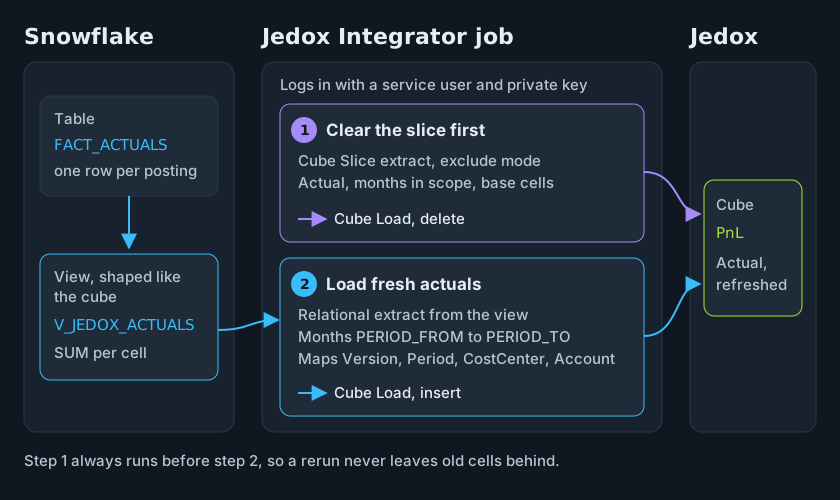
The job has four pieces:
| Step | Integrator component | What it does |
|---|---|---|
| 1 | Snowflake connection | Logs in as JEDOX_SVC with the private key |
| 2 | Cube Slice extract + Cube Load (delete mode) | Clears Actual for the months being reloaded |
| 3 | Relational extract | SELECT version, period, cost_center, account, amount FROM V_JEDOX_ACTUALS WHERE period BETWEEN ... |
| 4 | Cube Load | Writes the fresh actuals into PnL |
4. Set up the Snowflake connection
Use Integrator's dedicated Snowflake connection rather than a generic JDBC one. It's a premium connection that needs its own Jedox license, so check that before you start.
| Setting | Value |
|---|---|
| Host | Your Snowflake account URL |
| Method | Private key |
| Role | JEDOX_ETL_ROLE |
| Warehouse | JEDOX_ETL_WH |
| Database | FDH_DEMO |
Any extra JDBC parameters you add are appended to the connection URL.
Jedox's documentation for this connection lists the Private key method but doesn't mention a passphrase field, which is why step 1 uses an unencrypted key by default.
5. Clear the slice before you load
Here's the bug this step prevents. Say March was loaded on Monday with a posting on cost center CC4010, account Travel. On Tuesday, accounting reverses that posting, so it's no longer in Snowflake at all. If Tuesday's job only writes the rows it finds, the Monday value stays in the cube forever, because nothing ever overwrites it.
So the job first wipes the slice it's about to reload: version Actual, the months in scope, all cost centers, all accounts. Two components do it:
- A Cube Slice extract on
PnLwith slice modeexclude. Its query filters Version toActualand Period to the months in scope (for exampleinAlpharangewith[${PERIOD_FROM},${PERIOD_TO}]), with filter modeonlyBases. CostCenter and Account get no filter, so the slice covers every cost center and account for those months. - A Cube Load in mode
delete, splash modedefault. It removes every cell the extract returns and ignores the value column.
Held cells stop the clear
If a base cell inside the slice is on Hold, the delete load stops. Release the hold or narrow the slice before you rerun.
Keep the slice as narrow as the reload. If you only reload the last two months, only clear the last two months. Clearing the whole year to reload one month is how plans get wiped.
6. Extract and load the actuals
The relational extract reads the view for the same months you cleared:
SELECT version, period, cost_center, account, amount
FROM FDH_DEMO.SAMPLE.V_JEDOX_ACTUALS
WHERE period BETWEEN '${PERIOD_FROM}' AND '${PERIOD_TO}';
PERIOD_FROM and PERIOD_TO are job variables, so the same job can reload one month or a whole year. Because periods are zero-padded YYYY-MM strings, BETWEEN works as a plain text comparison.
The Cube Load writes into PnL in mode insert, which overwrites existing cells instead of adding to them. That's safe here because the view already sums each cell to a single row.
The view's column names don't match the cube's dimension names, so map them in the Cube Load's Dimension Mapping table:
| Source column | Cube dimension |
|---|---|
version |
Version |
period |
Period |
cost_center |
CostCenter |
account |
Account |
amount |
value |
Set Handling of missing elements to warning, so a new cost center that isn't in Jedox yet shows up in the log instead of failing silently.
Pick the load mode carefully
updateempties the whole cube before writing, budget and every other month included. Never use it for this job.addadds to existing values. If the clear step misses anything, a rerun doubles the numbers.createdeletes and rebuilds the cube, rules included.
7. Put the job together
A standard job runs the delete load first and the actuals load second. Order matters: if they run the other way round, the job clears the numbers it just loaded.
Check the result
After the job runs, compare a total in both systems. In Snowflake:
SELECT period, SUM(amount) AS total
FROM FDH_DEMO.SAMPLE.V_JEDOX_ACTUALS
WHERE period = '2026-03'
GROUP BY period;
Expected: 1,466,143.86 for 2026-03, from 58 rows
With the sample files (the 610-row version of fact_actuals.csv), the query returns 1,466,143.86 from 58 rows.
In Jedox, read the same total for Actual and 2026-03 at the top of CostCenter and Account. One catch: the sample stores revenue and expense as positive numbers. If your Account hierarchy subtracts expense from revenue, the top total won't match, so compare per account or per account type instead.
Then run the job a second time. The totals shouldn't change.
To see every query the job ran in the last 7 days, run this in Snowflake as a role with MONITOR on the warehouse:
USE ROLE SYSADMIN; -- or any role with MONITOR on JEDOX_ETL_WH
SELECT start_time, query_text, total_elapsed_time
FROM TABLE(FDH_DEMO.INFORMATION_SCHEMA.QUERY_HISTORY_BY_WAREHOUSE(WAREHOUSE_NAME => 'JEDOX_ETL_WH', END_TIME_RANGE_START => DATEADD('day', -7, CURRENT_TIMESTAMP()), RESULT_LIMIT => 10000))
WHERE query_tag = 'jedox_actuals_load'
ORDER BY start_time DESC;
If it doesn't match
- The totals double on a rerun: the load is adding instead of replacing. Check the Cube Load is in mode
insert, notadd. - An old value survives the rerun: the clear step isn't covering the slice. Check the Cube Slice extract filters Version and Period to the months you reload.
- The delete load stops: a base cell inside the slice is on Hold. Release the hold or narrow the slice.
- The top total in Jedox doesn't match Snowflake: your Account hierarchy may subtract expense from revenue. Compare per account or per account type.
- A cost center is missing in Jedox: it isn't an element in the cube yet. With Handling of missing elements set to
warning, it shows up in the job log.
Wrap-up
Three habits make this load reliable: a service user with a key pair and a narrow role, a Snowflake view that already looks like the cube, and a clear-then-load job scoped to exactly the months you're reloading.
Next: Plan vs. actuals in Snowflake uses the same sample data to build a variance in SQL, including the rows that exist on only one side.
Downloads
All files are synthetic sample data.