Plan vs. actuals in Snowflake SQL, without losing rows
A variance report has one job: show every amount that's in the budget or in the actuals. The most common way it fails is quiet. Somebody joins actuals to budget with a LEFT JOIN or an inner join, the report looks fine, and the rows that exist on only one side vanish.
What you'll build
- A Snowflake view,
V_PLAN_VS_ACTUAL, that joins budget and actuals with aFULL OUTER JOINand labels which side each row came from. - A favorable/unfavorable flag by account type.
- A closed-periods filter and a one-month summary per account type that you can check against a known total.
Before you start
You'll need
- The sample tables loaded into
FDH_DEMO.SAMPLEwithload_snowflake.sql: Downloads. - A Snowflake role that can create a view there. The demo uses
SYSADMIN. - A warehouse you can use. The demo uses
JEDOX_ETL_WHfrom From Snowflake to Jedox.
The sample scenario
This post uses the site's made-up sample data: 10 cost centers and 8 accounts. The budget covers October 2025 to September 2026 and the actuals cover October 2025 to August 2026.
The sample data has both kinds of rows that go missing, on purpose:
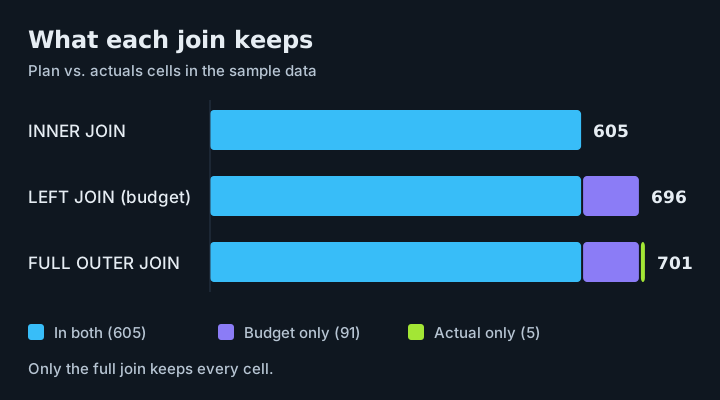
- Budget only. 91 cells have a budget but no actual. 58 of them are September 2026, which hasn't closed yet. The other 33 are cells where nothing was posted.
- Actual only. 5 postings of Material Cost (account
500000) land on cost centers CC3010 and CC6000, which have no budget for that account at all. Together they're 14,896.50 of unbudgeted spend.
The second group is the one that matters most. Unbudgeted spend is exactly what a controller wants to see, and it's exactly what a budget-driven join throws away.
1. Sum each side first
Never join two fact tables at posting level. If a cell has three actual postings and two budget rows, a direct join produces six rows and inflates both totals. Sum each side to one row per cell first, then join.
USE ROLE SYSADMIN;
USE SCHEMA FDH_DEMO.SAMPLE;
USE WAREHOUSE JEDOX_ETL_WH;

WITH budget AS (
    SELECT cost_center, account, period, SUM(amount) AS budget
    FROM FACT_BUDGET
    GROUP BY cost_center, account, period
),
actuals AS (
    SELECT cost_center, account, period, SUM(amount) AS actual
    FROM FACT_ACTUALS
    GROUP BY cost_center, account, period
)
SELECT COUNT(*) FROM budget; -- 696 cells
JEDOX_ETL_WH is created in the From Snowflake to Jedox post; use any warehouse you can use.
Why SYSADMIN here
We use SYSADMIN to keep the demo short. In a real setup, run this with a dedicated setup role that has only the rights this step needs, such as creating the view and granting access to it.
2. Join with a full outer join
Swipe to see the full diagram →
USE ROLE SYSADMIN;
USE SCHEMA FDH_DEMO.SAMPLE;
USE WAREHOUSE JEDOX_ETL_WH;

CREATE OR REPLACE VIEW V_PLAN_VS_ACTUAL AS
WITH budget AS (
    SELECT cost_center, account, period, SUM(amount) AS budget
    FROM FACT_BUDGET
    GROUP BY cost_center, account, period
),
actuals AS (
    SELECT cost_center, account, period, SUM(amount) AS actual
    FROM FACT_ACTUALS
    GROUP BY cost_center, account, period
)
SELECT
    COALESCE(a.cost_center, b.cost_center) AS cost_center,
    COALESCE(a.account, b.account) AS account,
    COALESCE(a.period, b.period) AS period,
    COALESCE(b.budget, 0) AS budget,
    COALESCE(a.actual, 0) AS actual,
    COALESCE(a.actual, 0) - COALESCE(b.budget, 0) AS variance,
    CASE
        WHEN a.cost_center IS NULL THEN 'Budget only'
        WHEN b.cost_center IS NULL THEN 'Actual only'
        ELSE 'Both'
    END AS match_status
FROM actuals AS a
FULL OUTER JOIN budget AS b
    ON a.cost_center = b.cost_center
    AND a.account = b.account
    AND a.period = b.period;
Three details carry the whole thing:
COALESCEon the keys. On a budget-only row, every column fromactualsis NULL, so the key has to come from whichever side exists.COALESCEon the amounts.100 - NULLis NULL, not 100. Without the zero, every one-sided row would show no variance at all.match_status. It costs one line and makes the gaps visible instead of leaving readers to guess why a cell shows zero.
NULL keys never match
If a key column in your source can be NULL, replace it with something like '(none)' inside the two CTEs. NULL = NULL never matches in a join, so otherwise the same cell comes out as two one-sided rows.
3. Flag favorable or unfavorable
In the sample, revenue and expense are both stored as positive numbers. That means "actual minus budget" reads differently by account type: more revenue is good, more expense is bad. Join the account dimension and flag it:
SELECT
    v.*,
    d.account_type,
    CASE
        WHEN v.variance = 0 THEN 'On plan'
        WHEN d.account_type = 'REVENUE' AND v.variance > 0 THEN 'Favorable'
        WHEN d.account_type = 'EXPENSE' AND v.variance < 0 THEN 'Favorable'
        ELSE 'Unfavorable'
    END AS variance_flag
FROM V_PLAN_VS_ACTUAL AS v
JOIN DIM_ACCOUNT AS d
    ON d.account = v.account;
If your ledger stores revenue as negative numbers, flip the revenue sign before this step, not after.
4. Leave out months that haven't closed
September 2026 has a budget and no actuals yet, so all 58 September cells show as "Budget only". Of those, 54 are expense cells, and zero spend against budget makes every one of them Favorable. The 4 revenue cells show as Unfavorable. An unclosed month makes costs look great, which is correct data and a misleading report. Filter to closed periods:
This works as plain text comparison only because periods are stored as zero-padded YYYY-MM. With 2026-9 instead of 2026-09, September would sort after 2026-10. In a real model, take the last closed period from a fiscal calendar table instead of typing it.
5. Summarize one month by account type
For March 2026:
SELECT d.account_type,
       SUM(v.budget) AS budget,
       SUM(v.actual) AS actual,
       SUM(v.variance) AS variance
FROM V_PLAN_VS_ACTUAL AS v
JOIN DIM_ACCOUNT AS d ON d.account = v.account
WHERE v.period = '2026-03'
GROUP BY d.account_type
ORDER BY d.account_type;
| account_type | budget | actual | variance |
|---|---|---|---|
| EXPENSE | 1,207,184.99 | 1,236,450.39 | 29,265.40 |
| REVENUE | 223,769.38 | 229,693.47 | 5,924.09 |
Actuals add up to 1,466,143.86. If you load the same sample files anywhere else, March should give that same total, which makes it a handy check.
Check the result
Count the cells by match_status:
SELECT match_status,
       COUNT(*) AS cells,
       SUM(budget) AS budget,
       SUM(actual) AS actual
FROM V_PLAN_VS_ACTUAL
GROUP BY match_status
ORDER BY match_status;
Expected: 701 cells in total
On the sample files this returns the rows below. A LEFT JOIN from budget would return only 696, and the report would be 14,896.50 short on actuals with nothing on screen to say so.
| match_status | cells | budget | actual |
|---|---|---|---|
| Actual only | 5 | 0.00 | 14,896.50 |
| Both | 605 | 14,968,531.49 | 15,431,676.59 |
| Budget only | 91 | 2,284,689.40 | 0.00 |
If it doesn't match
- You get 696 cells, not 701: the join is a
LEFT JOINfrom budget. UseFULL OUTER JOIN. - Totals are inflated: the fact tables were joined at posting level. Sum each side to one row per cell first.
- One-sided rows show no variance: the amounts aren't wrapped in
COALESCE(..., 0). - The same cell appears as two one-sided rows: a key column is NULL. Replace it with something like
'(none)'inside the two CTEs. - Costs look very favorable: an unclosed month is in the report. Filter to closed periods.
Wrap-up
Sum each side to one row per cell, join with FULL OUTER JOIN, COALESCE both the keys and the amounts, and label which side each row came from. Then filter out months that haven't closed. That's a variance report that can't quietly lose money.
Next: Relational extract: table setup or your own SQL? loads the same March actuals into Jedox two ways.
Downloads
All files are synthetic sample data.